Quantum vmPRO 4000 Guida Utente Pagina 205
- Pagina / 241
- Indice
- SEGNALIBRI

- Quantum vmPRO 1
- Quantum vmPRO User’s Guide ii 2
- Contents 3
- Quantum vmPRO User’s Guide iv 4
- Chapter 3: vmPRO GUI 103 5
- Quantum vmPRO User’s Guide vi 6
- Audience 8
- Notational Conventions 9
- Product Safety Statements 10
- Related Documents 11
- Contacts 12
- Comments 12
- Chapter 1: Quantum vmPRO 14
- SmartMotion™ 15
- SmartView™ 15
- Progressive Optimization 15
- Additional vmPRO Highlights 16
- Chapter 2: vmPRO Setup and 17
- Configuration 17
- Installation Notes 18
- Configuration Tips 18
- Quantum vmPRO Requirements 19
- Quantum vmPRO User’s Guide 7 20
- Appliance 21
- Quantum vmPRO User’s Guide 9 22
- Quantum vmPRO User’s Guide 10 23
- Quantum vmPRO User’s Guide 11 24
- Quantum vmPRO User’s Guide 12 25
- Configuration Wizard 26
- Capacity-Based License 27
- Target-Based License 28
- Quantum vmPRO User’s Guide 16 29
- Figure12:Summary Tab 29
- Quantum vmPRO User’s Guide 17 30
- Quantum vmPRO User’s Guide 18 31
- Quantum vmPRO User’s Guide 20 33
- Quantum vmPRO User’s Guide 22 35
- Quantum vmPRO User’s Guide 23 36
- Discovering Servers 37
- Quantum vmPRO User’s Guide 25 38
- Figure20:Servers Page 38
- Quantum vmPRO User’s Guide 26 39
- Quantum vmPRO User’s Guide 27 40
- Quantum vmPRO User’s Guide 28 41
- Figure24:Servers Page 41
- Configure a vCenter Server 42
- Quantum vmPRO User’s Guide 30 43
- Figure26:Servers Page 43
- Quantum vmPRO User’s Guide 31 44
- Quantum vmPRO User’s Guide 32 45
- Quantum vmPRO User’s Guide 34 47
- Quantum vmPRO User’s Guide 35 48
- Quantum vmPRO User’s Guide 36 49
- Quantum vmPRO User’s Guide 37 50
- Figure35:Servers Page 50
- Quantum vmPRO User’s Guide 38 51
- Figure36:Server List 51
- Quantum vmPRO User’s Guide 39 52
- Manually discover servers 53
- User-Accessible Shares 54
- Back-End Storage 55
- Quantum vmPRO User’s Guide 43 56
- GeneralConfiguration page 57
- WorkGroup Authentication 58
- AD Authentication 59
- Quantum vmPRO User’s Guide 47 60
- Quantum vmPRO User’s Guide 48 61
- Quantum vmPRO User’s Guide 49 62
- Configuration page 63
- Configure an NFS protocol 64
- Mounting Options 65
- Additional Functions 65
- Quantum vmPRO User’s Guide 53 66
- Quantum vmPRO User’s Guide 54 67
- Figure53:Storage Page 67
- Quantum vmPRO User’s Guide 55 68
- Quantum vmPRO User’s Guide 56 69
- Group Mode Licensing 71
- Configuring vmPRO Groups 72
- Quantum vmPRO User’s Guide 60 73
- Managing vmPRO Groups 74
- Assign VMs to nodes 75
- Import group configurations 75
- Quantum vmPRO User’s Guide 63 76
- Quantum vmPRO User’s Guide 64 77
- Configuring vmPRO Folders 78
- Assign VMs To Folders 79
- Autosupport 81
- Quantum vmPRO User’s Guide 69 82
- Quantum vmPRO User’s Guide 70 83
- Quantum vmPRO User’s Guide 71 84
- Quantum vmPRO User’s Guide 72 85
- Configuration Considerations 86
- Quantum vmPRO User’s Guide 74 87
- Access Levels 88
- Authentication Credentials 88
- Quantum vmPRO User’s Guide 76 89
- Online Upgrades 90
- Offline Upgrades 91
- Upgrade Notes 92
- Quantum vmPRO User’s Guide 81 94
- Quantum vmPRO User’s Guide 82 95
- Requirements 96
- CBT Cycle 97
- CBT Considerations 98
- Quantum vmPRO User’s Guide 86 99
- Schedule a CBT Cycle Reset 100
- Quantum VSS Writer 101
- Supported Systems 102
- VSS Resources 103
- Quantum vmPRO User’s Guide 91 104
- Quantum vmPRO User’s Guide 92 105
- Quantum vmPRO User’s Guide 93 106
- Uninstalling the VSS Writer 107
- Quantum vmPRO User’s Guide 95 108
- Quantum vmPRO User’s Guide 96 109
- Quantum vmPRO User’s Guide 97 110
- Prerequisites 111
- Verification 112
- Chapter 3: vmPRO GUI 116
- Chapter 3: vmPROGUI 117
- Accessing the vmPRO GUI 118
- SmartMotion Backup Menu 121
- Configure Menu 121
- Operations Menu 124
- Figure87:Logout Dialog Box 127
- Help Menu 128
- Figure88:Home Console 129
- Virtual Machines Tab 131
- Folders Tab 133
- Resources Tab 134
- Column Description 135
- Auto-Export Tips 136
- FormultipleVMs 137
- History pane 144
- Backup Tab 145
- Recovery Tab 148
- History Tab 149
- Chapter 4: vmPRO 151
- SmartMotion™ Backup 151
- Additional Notes 153
- Considerations 155
- Important Concepts 156
- Multiple Retention Schedules 157
- Create a backup policy 160
- Example 163
- Figure114:Monthly Tab 166
- BackupPolicy dialog box 167
- Chapter 5: vmPRO Data 170
- Recovery 170
- Virtual Machine (VM) Recovery 171
- Exchange Recovery 171
- Recovering Virtual Machines 172
- Recover a single VM 175
- Recover multiple VMs 177
- Configure policy mappings 180
- Application 182
- Members list 190
- Exchange2010: 191
- VM to recover: 198
- Field Description 199
- Remove the vmPRO Target 204
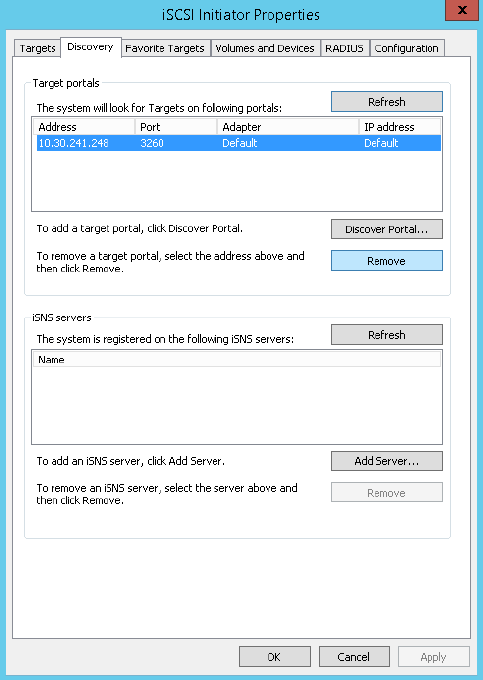
- Remove the iSCSI Target 205
- Figure155:Targets Page 211
- Abort an iSCSI export 213
- Individual File Recovery 214
- Recovering Individual Files 215
- Appendix 1: vmPRO CLI Guide 218
- Supported Console Commands 219
- Appendix 1: vmPRO CLIGuide 220
- SupportedCommands 241
© 2020, manymanuals.it. Tutti i diritti riservati | 0.032 s |
 Manymanuals.com
 Manymanuals.de
 Manymanuals.fr
 Manymanuals.it
 Manymanuals.pl
 Manymanuals.cz
 Manymanuals.es
 Manymanuals-pt.com
Commenti su questo manuale